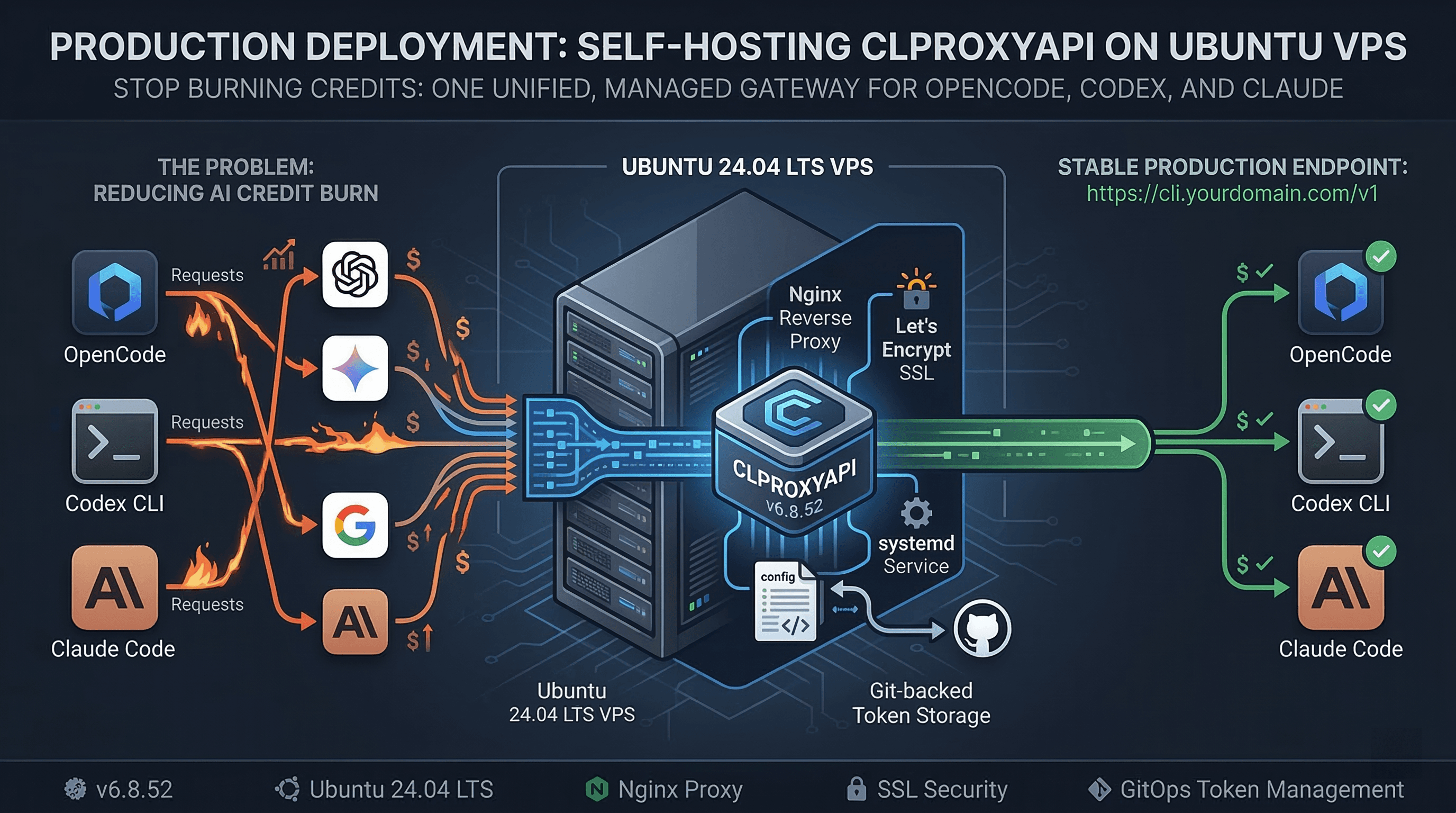


How I Stopped Burning OpenAI Credits: Self-Hosting CLIProxyAPI on an Ubuntu VPS
I hit a very specific developer pain point this year: I was running out of OpenAI credits while my non-technical friends barely touched theirs.
Same family plan. Same billing cycle. Totally different burn rates.
I was doing real engineering work every day (OpenCode sessions, Codex CLI loops, Claude Code debugging), and my usage curve looked like a denial-of-service attack against my own wallet.
So instead of playing subscription roulette, I set up a single self-hosted AI gateway on a VPS with CLIProxyAPI v6.8.52.
Result: one endpoint and one auth layer for OpenAI-compatible clients, shared across tools and providers.
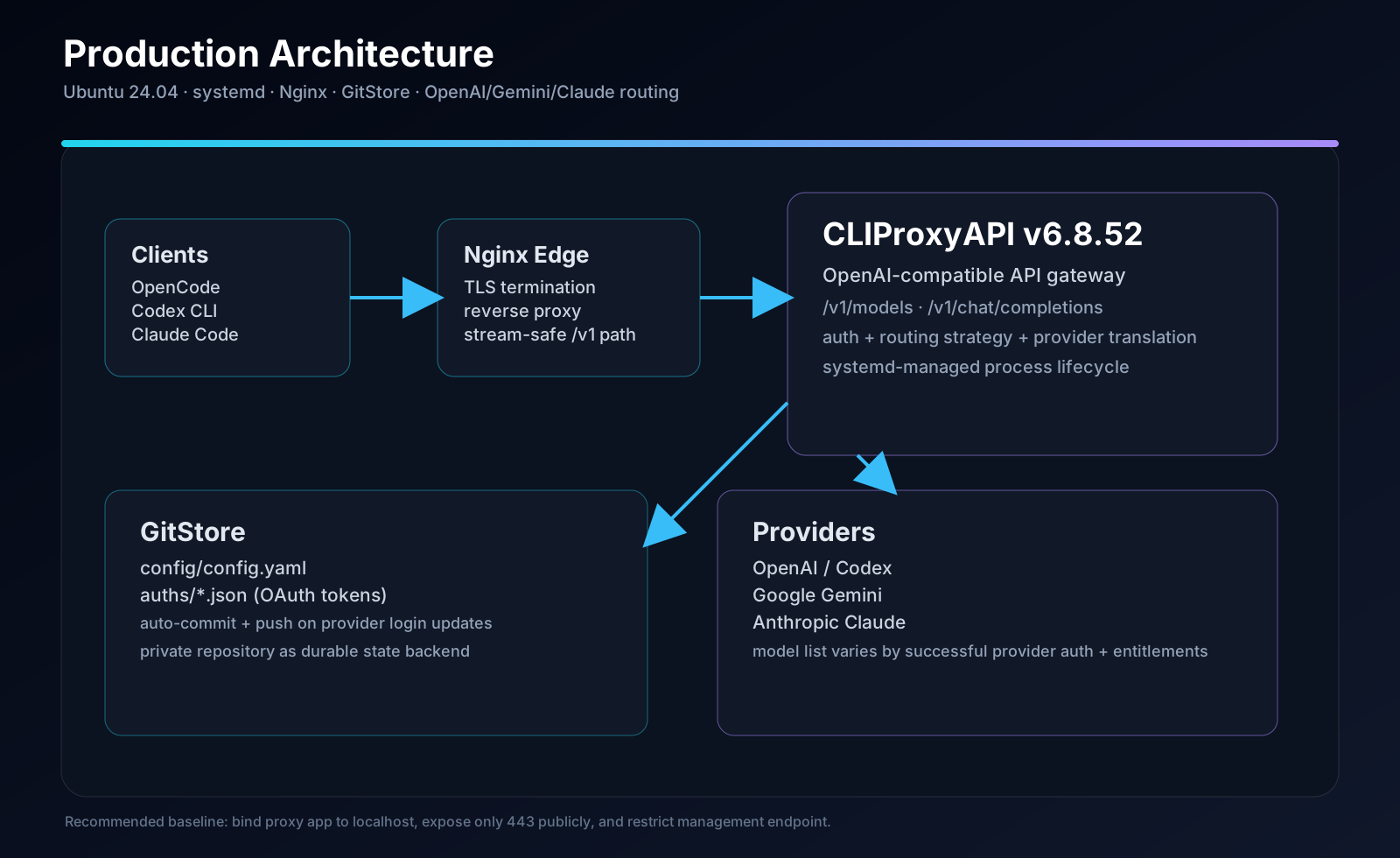
Stack in this guide: Ubuntu 24.04 LTS, CLIProxyAPI v6.8.52, systemd, Git-backed token storage, Nginx reverse proxy, Let's Encrypt SSL, OpenCode/Codex CLI/Claude Code integration.
1) Overview
CLIProxyAPI is an open-source AI proxy that unifies multiple providers (OpenAI/Codex, Gemini, Claude, and others) behind one authenticated API gateway.
It exposes OpenAI-compatible endpoints (/v1/*) and provider-specific compatibility bridges, so coding agents and CLIs can connect without provider-specific rewrites.
This guide covers a full production deployment on Ubuntu VPS:
- Binary installation
- systemd service hardening
- Git-backed token storage
- Nginx reverse proxy
- HTTPS via Let's Encrypt
- OpenCode, Claude Code, and Codex CLI wiring
1.1 Architecture Overview
| Property | Value / Description |
|---|---|
| Binary | /home/<user>/cliproxyapi/cli-proxy-api |
| Version | v6.8.52 |
| Service manager | systemd |
| Internal port | 8317 |
| Public access | https://cli.yourdomain.com |
| Web UI | https://cli.yourdomain.com/management.html |
| Token storage | Private Git repo (auto-commit & push on login) |
| Reverse proxy | Nginx |
| SSL | Let's Encrypt (Certbot) |
| OS | Ubuntu 24.04 LTS |
1.2 Model Catalog (Example from /v1/models)
After provider login succeeds, your OpenAI-compatible endpoint exposes model IDs based on your authenticated providers and account entitlements.
The list below is illustrative (not guaranteed on every deployment):
gpt-5,gpt-5.1,gpt-5.1-codex,gpt-5.1-codex-max,gpt-5.3-codex,gpt-5.4gemini-2.5-flash,gemini-2.5-flash-lite,gemini-3-pro-high,gemini-3.1-flash-imageclaude-sonnet-4-6,claude-opus-4-6-thinkinggpt-oss-120b-medium
Query your live catalog any time:
curl https://cli.yourdomain.com/v1/models \
  -H 'Authorization: Bearer your-proxy-api-key'
2) Prerequisites
2.1 VPS and OS Requirements
- Ubuntu 22.04+ (this guide uses 24.04 LTS)
- Non-root user with
sudo - Open ports
80and443 - Keep
8317private (localhost-only) unless you have a specific reason to expose it - Domain with DNS control
- Git installed
sudo apt update
sudo apt install git -y
2.2 Private GitHub Repo for Token Storage
Git storage allows CLIProxyAPI to:
- Clone your private repo at startup
- Persist
config/config.yaml - Commit and push OAuth token files after successful Web UI login
Create:
- A private repo (e.g.
my-cliproxyapi-config) - At least one initial commit (
README.mdis enough) - A PAT with
reposcope
In my setup, classic PAT was the stable path. If fine-grained tokens produce 403 in your org policy setup, switch to a classic token scoped for repo access.
3) Binary Installation
3.1 One-Click Linux Installer
curl -fsSL https://raw.githubusercontent.com/brokechubb/cliproxyapi-installer/refs/heads/master/cliproxyapi-installer | bash
Installer behavior note: it drops the binary in the current working directory.
3.2 Locate the Binary
find / -name 'cli-proxy-api' 2>/dev/null
Use the root-level binary path (not a version-subfolder copy) for ExecStart.
3.3 Prepare Working Directory
mkdir -p ~/cliproxyapi
cd ~/cliproxyapi

curl -fsSL https://raw.githubusercontent.com/router-for-me/CLIProxyAPI/main/config.example.yaml \
  -o config.example.yaml
4) Application Configuration
When Git storage is active, the operational config lives at:
~/cliproxyapi/gitstore/config/config.yaml
Minimal baseline:
host: "127.0.0.1"
port: 8317

remote-management:
  allow-remote: false
  secret-key: "your-management-key"
  disable-control-panel: false

auth-dir: "/home/<your-linux-user>/cliproxyapi/gitstore/auths"

api-keys:
  - "your-proxy-api-key"

debug: false
Important separation:
api-keys: credentials your downstream clients send- OAuth token files: provider credentials generated via Web UI login
4.1 Key Fields Reference
| Field | Default | Description |
|---|---|---|
| host | "" | Upstream default is all interfaces; for production, prefer 127.0.0.1 behind Nginx |
| port | 8317 | Listen port |
| remote-management.allow-remote | false | Keep false unless you intentionally publish management access |
| remote-management.secret-key | empty | Management secret (empty can disable management) |
| auth-dir | ~/.cli-proxy-api | OAuth token directory; in GitStore setups, align this with your gitstore auth path |
| api-keys | [] | Accepted client API keys |
| request-retry | 3 | Retry budget for transient upstream errors |
| routing.strategy | round-robin | Credential selection strategy |
5) systemd Service (Production)
Create a root-only environment file first:
sudo mkdir -p /etc/cliproxyapi
sudo chmod 700 /etc/cliproxyapi
sudo tee /etc/cliproxyapi/cliproxyapi.env >/dev/null <<'EOF'
GITSTORE_GIT_URL=https://github.com/YOUR_USER/YOUR_REPO.git
GITSTORE_GIT_USERNAME=YOUR_GITHUB_USERNAME
GITSTORE_GIT_TOKEN=ghp_xxxxxxxxxxxxxxxxxxxx
GITSTORE_LOCAL_PATH=/home/<your-linux-user>/cliproxyapi
MANAGEMENT_PASSWORD=your-management-password
EOF
sudo chmod 600 /etc/cliproxyapi/cliproxyapi.env
Then create /etc/systemd/system/cliproxyapi.service:
[Unit]
Description=CLIProxyAPI Service
After=network.target

[Service]
Type=simple
User=<your-linux-user>
WorkingDirectory=/home/<your-linux-user>/cliproxyapi
EnvironmentFile=/etc/cliproxyapi/cliproxyapi.env

# Minimal hardening defaults
NoNewPrivileges=true
PrivateTmp=true
UMask=0077

ExecStart=/home/<your-linux-user>/cliproxyapi/cli-proxy-api
Restart=always
RestartSec=5

[Install]
WantedBy=multi-user.target
5.1 Service Lifecycle Commands
sudo systemctl daemon-reload
sudo systemctl enable cliproxyapi
sudo systemctl start cliproxyapi

sudo systemctl status cliproxyapi
sudo journalctl -u cliproxyapi -n 50 --no-pager
sudo journalctl -u cliproxyapi -f
Critical gotcha:
GITSTORE_LOCAL_PATH must point to the parent directory, not .../gitstore.
Version note: GitStore env var names/behavior can evolve by release. Validate on your target version using service logs after first boot.
6) Git-Backed Token Storage Internals
6.1 Boot + Sync Sequence
At startup:
- Clone remote repo into
GITSTORE_LOCAL_PATH/gitstore/ - Load
config/config.yaml - Bootstrap config from example if missing
- Commit + push token file updates after OAuth logins
Typical repo structure:
your-repo/
├── config/
│   └── config.yaml
└── auths/
    └── codex-user@gmail.com-plus.json
6.2 Verify Push Path
cd ~/cliproxyapi/gitstore
git remote -v
git log --oneline

sudo systemctl show cliproxyapi --property=Environment | sed 's/GITSTORE_GIT_TOKEN=[^ ]*/GITSTORE_GIT_TOKEN=***REDACTED***/g'
If push auth fails:
- Recheck token scope/expiry
- Confirm repo write access
- Validate URL and username format
7) Web UI + OAuth Provider Login
7.1 Access
- Local:
http://localhost:8317/management.html - Public (recommended with restriction):
https://cli.yourdomain.com/management.html
For production, avoid exposing management UI globally. Restrict by source IP or keep it localhost-only via SSH tunnel.
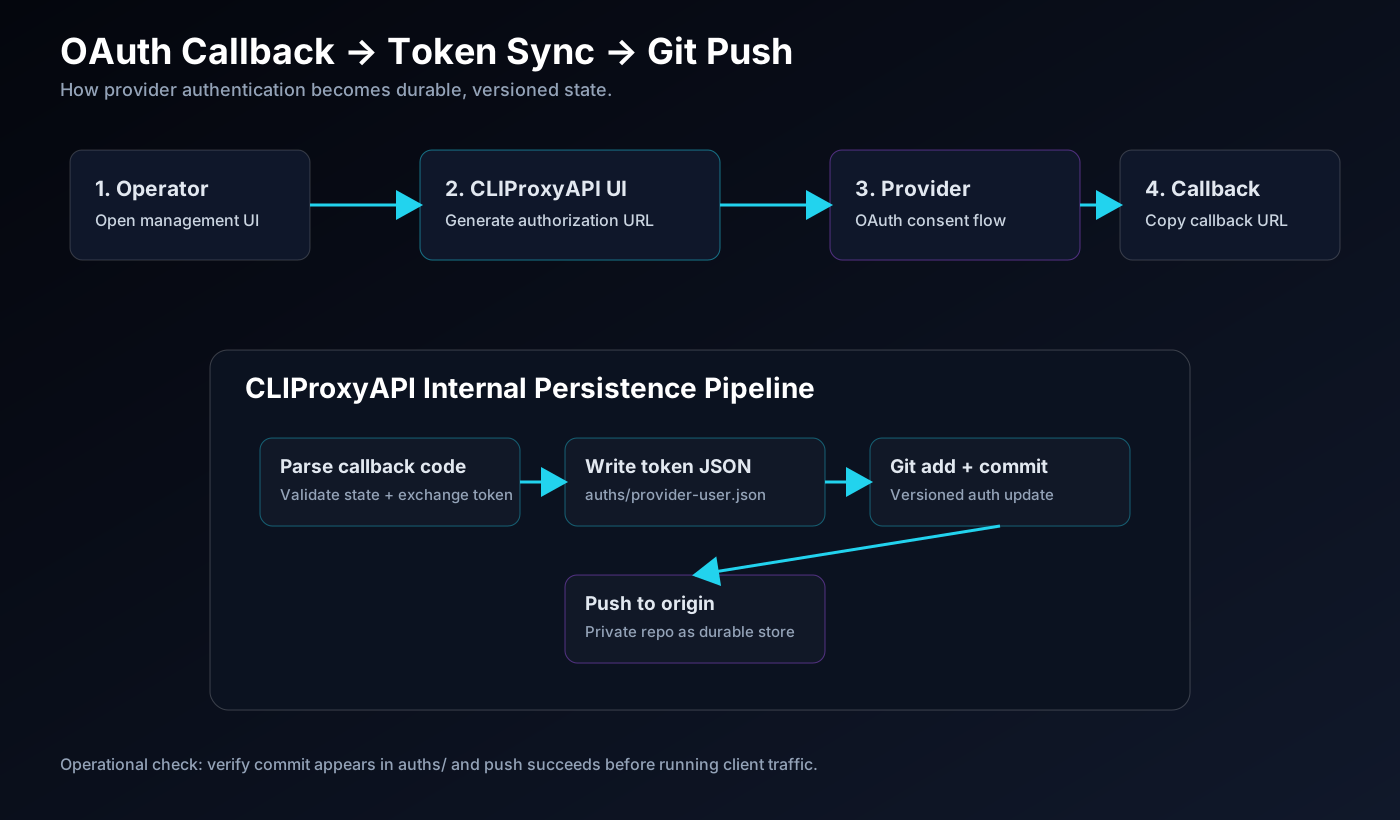
7.2 OAuth Flow (Codex / Gemini / Claude)
- Open provider page in management UI
- Click Login
- Complete provider auth in browser
- Copy full callback URL (e.g.
http://localhost:1455/auth/callback?...) - Paste callback URL back in UI and submit
On success, token JSON is persisted and pushed to your Git repo.
8) Nginx Reverse Proxy + Let's Encrypt SSL
8.1 DNS A Record
Point cli.yourdomain.com to your VPS public IP.
8.2 Install Nginx
sudo apt update
sudo apt install nginx -y
sudo systemctl enable nginx
sudo systemctl start nginx
8.3 Nginx Site Config
/etc/nginx/sites-available/cli.yourdomain.com
server {
    listen 80;
    server_name cli.yourdomain.com;

    client_max_body_size 10m;

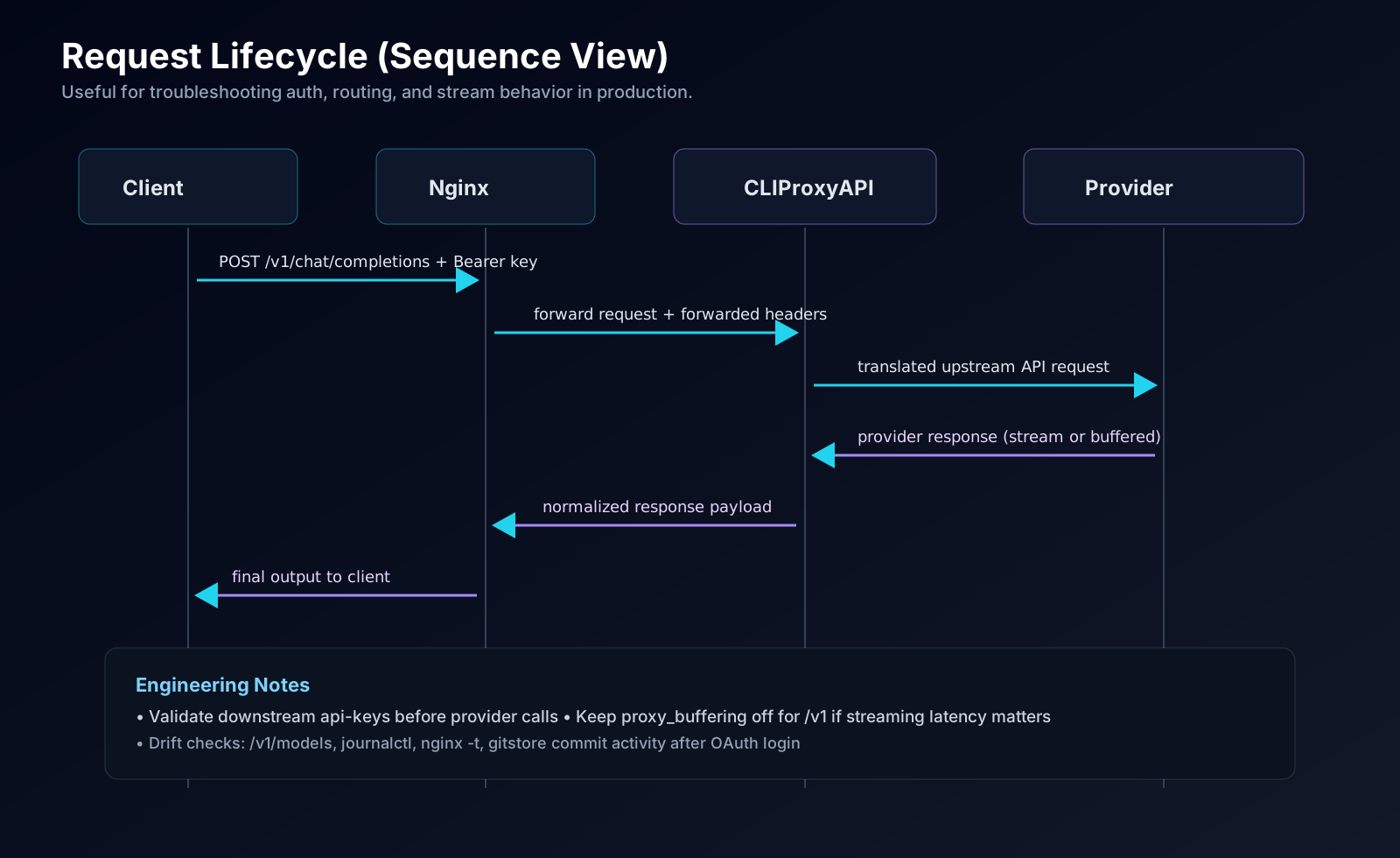
    location /v1/ {
        proxy_pass         http://127.0.0.1:8317;
        proxy_http_version 1.1;
        proxy_set_header   Host $host;
        proxy_set_header   X-Real-IP $remote_addr;
        proxy_set_header   X-Forwarded-For $proxy_add_x_forwarded_for;
        proxy_set_header   X-Forwarded-Proto $scheme;
        proxy_buffering    off;
        proxy_read_timeout 300s;
        proxy_send_timeout 300s;
        proxy_buffer_size 16k;
        proxy_buffers 8 16k;
    }

    location = /management.html {
        allow <your-static-ip>;
        deny all;
        proxy_pass         http://127.0.0.1:8317;
        proxy_http_version 1.1;
        proxy_set_header   Host $host;
        proxy_set_header   X-Real-IP $remote_addr;
        proxy_set_header   X-Forwarded-For $proxy_add_x_forwarded_for;
        proxy_set_header   X-Forwarded-Proto $scheme;
    }

    location / {
        proxy_pass         http://127.0.0.1:8317;
        proxy_http_version 1.1;
        proxy_set_header   Host $host;
        proxy_set_header   X-Real-IP $remote_addr;
        proxy_set_header   X-Forwarded-For $proxy_add_x_forwarded_for;
        proxy_set_header   X-Forwarded-Proto $scheme;
        proxy_read_timeout 300s;
        proxy_send_timeout 300s;
    }
}
Enable + test:
sudo ln -s /etc/nginx/sites-available/cli.yourdomain.com /etc/nginx/sites-enabled/
sudo nginx -t
sudo systemctl reload nginx
8.4 SSL with Certbot
sudo apt install certbot python3-certbot-nginx -y
sudo certbot --nginx -d cli.yourdomain.com
sudo nginx -t
sudo systemctl status certbot.timer
8.5 Firewall
sudo ufw allow OpenSSH
sudo ufw allow 80/tcp
sudo ufw allow 443/tcp
sudo ufw enable
sudo ufw status
9) OpenCode Integration
OpenCode custom providers are configured in project-root opencode.json.
{
  "$schema": "https://opencode.ai/config.json",
  "provider": {
    "cliproxy": {
      "npm": "@ai-sdk/openai-compatible",
      "name": "CLIProxy",
      "options": {
        "baseURL": "https://cli.yourdomain.com/v1",
        "apiKey": "your-proxy-api-key"
      },
      "models": {
        "gpt-5.1-codex": { "name": "GPT-5.1 Codex" },
        "gpt-5.1-codex-max": { "name": "GPT-5.1 Codex Max" },
        "gpt-5.3-codex": { "name": "GPT-5.3 Codex" },
        "gemini-2.5-flash": { "name": "Gemini 2.5 Flash" },
        "claude-opus-4-6-thinking": { "name": "Claude Opus 4.6 Thinking" }
      }
    }
  },
  "model": "cliproxy/gpt-5.1-codex"
}
Critical details:
- In the OpenCode version used for this setup, key is
provider(singular). If you see a schema error, verify against your installed OpenCode schema and adjust. - Custom providers may not show in
/connectUI (expected) modelfield still works directly
10) Codex CLI + Claude Code + Generic Clients
Claude Code
export ANTHROPIC_BASE_URL=https://cli.yourdomain.com
export ANTHROPIC_API_KEY=your-proxy-api-key
claude
If your local Claude Code build ignores ANTHROPIC_BASE_URL, check the CLI docs/help for the supported base URL override variable in your version.
Codex CLI
export OPENAI_BASE_URL=https://cli.yourdomain.com/v1
export OPENAI_API_KEY=your-proxy-api-key
codex
If your codex build ignores OPENAI_BASE_URL, confirm the exact override flag/env var with codex --help.
Generic OpenAI-Compatible Call
curl https://cli.yourdomain.com/v1/chat/completions \
  -H 'Authorization: Bearer your-proxy-api-key' \
  -H 'Content-Type: application/json' \
  -d '{
    "model": "gpt-5.1-codex",
    "messages": [{"role": "user", "content": "Write binary search in Python"}]
  }'
11) Troubleshooting Matrix (Real Failure Modes)
| Error / Symptom | Likely Root Cause | Fast Fix |
|---|---|---|
| status=203/EXEC in systemd | Wrong ExecStart path | find / -name cli-proxy-api and fix service file |
| destination path already exists | GITSTORE_LOCAL_PATH incorrectly includes /gitstore | Set parent path only; stop service before deleting clone |
| git push: authentication required | Invalid/expired token | Regenerate PAT and verify env injection |
| 403 Write access not granted | Repo token/scope mismatch | Adjust token type/scope according to org policy |
| OpenCode providers is not allowed | Wrong JSON key | Use provider (singular) |
| Custom provider missing in /connect | Expected OpenCode behavior | Set model directly in config |
| PowerShell curl header issues | Alias mismatch (curl != curl.exe) | Use curl.exe or Invoke-RestMethod |
| Web UI 404 (management.html) | Control panel assets not available yet | Check startup logs and control panel flags |
11.1 Diagnostics Pack
sudo journalctl -u cliproxyapi -n 100 --no-pager
sudo journalctl -u cliproxyapi -f

sudo systemctl show cliproxyapi --property=Environment | sed 's/GITSTORE_GIT_TOKEN=[^ ]*/GITSTORE_GIT_TOKEN=***REDACTED***/g'

cd ~/cliproxyapi/gitstore && git log --oneline && git remote -v

sudo nginx -t
sudo ss -tlnp | grep -E '8317|80|443'

curl https://cli.yourdomain.com/v1/models -H 'Authorization: Bearer your-proxy-api-key'

12) Quick Reference Card
| Property | Value |
|---|---|
| Binary path | ~/cliproxyapi/cli-proxy-api |
| Service file | /etc/systemd/system/cliproxyapi.service |
| App config | ~/cliproxyapi/gitstore/config/config.yaml |
| Auth token dir | ~/cliproxyapi/gitstore/auths/ |
| Nginx site | /etc/nginx/sites-available/cli.yourdomain.com |
| SSL cert path | /etc/letsencrypt/live/cli.yourdomain.com/ |
| Internal port | 8317 |
| Public base URL | https://cli.yourdomain.com |
| Web UI | https://cli.yourdomain.com/management.html |
| Models endpoint | https://cli.yourdomain.com/v1/models |
| Chat endpoint | https://cli.yourdomain.com/v1/chat/completions |
| OpenCode config key | provider |
| OpenCode adapter | @ai-sdk/openai-compatible |
| Recommended default model | cliproxy/gpt-5.1-codex |
Final Thoughts
Self-hosting this stack was less about “saving money” and more about controlling the interface between tools, teams, and model vendors.
Once I moved to a central proxy, I stopped juggling provider-specific edge cases across every CLI and started treating AI access like any other production service: versioned, observable, and repeatable.
And yes—my monthly credit panic dropped immediately.
The big win wasn’t just fewer billing surprises. It was having a stable platform where my heavy engineering usage and my friends’ occasional prompting could coexist without chaos.
If you want broader provider coverage or extended routing features, check CLIProxyAPIPlus:
- https://github.com/router-for-me/CLIProxyAPIPlus
I’m also building a CLI around my own workflow constraints and multiplexed usage patterns:
- https://github.com/XQuestCode/SubMux